


Small Planet Communications, Inc. + 15 Union Street, Lawrence, MA 01840 + (978) 794-2201 + Contact

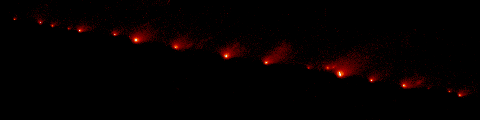
On this page, you'll be asked to track down some specific data about Comet Shoemaker-Levy 9. (Hint: After you read the page, you might want to print it out. That way you can look at the questions and instructions while you are searching for information on other sites.) You can save links to any images or videos that you come across during your research. If you find any facts that are especially interesting, make a note of them. You might want to use these facts, along with some of the images and videos you find, to make your own SL9 Web page later.
The Reference Shelf is a good place to begin your research. As you follow links to other sites, you'll probably find that some sites are better than others. Keep track of any Web sites you think are really good, in case you want to link them to your own Web page.
- Before it collided with Jupiter, for how many years do scientists believe SL9 had orbited the planet? About how many years did it take for the comet to orbit Jupiter once?
- What system did scientists use to name each fragment of SL9? Which fragment was thought to be the largest, and why?
- The impacts occurred on the far side of Jupiter, from Earth's perspective. How were we able to observe the effects of the collision? How long did scientists on Earth have to wait to get a look at the impact sites?
- What was the predicted date and time of impact of fragment Q1? When did it actually hit?
- Describe what happened when a fragment hit Jupiter.
- The Hubble Space Telescope was used to observe activities on Jupiter during the comet's impact. What unusual events involving Jupiter's aurorae (glowing gases in the atmosphere) did HST reveal? What comet fragment caused this activity?
- What have scientists learned from data collected after the comet's impact? Specifically, what have they learned about Jupiter's wind patterns?
- As you research the answers to these questions, keep track of any other interesting facts you come across. You can use these to create your own Web page or just share them with your classmates.
- Now it's time to find some images and videos you can link to on your Web page.
Images and Videos
Here are just a few websites with images and videos about Comet Shoemaker-Levy 9 that you can explore and consider linking to on your own Web page:
- Comet Shoemaker-Levy Home Page / Jet Propulsion Laboratory
- Images from Comet P/Shoemaker-Levy 9 (SL-9) Collision with Jupiter / NASA
- Collision: Comet Shoemaker Levy 9 / European Space Agency (ESA)
- Hubble Memorable Moments: Comet Impact / NASA
- Comet Hits Jupiter / BBC
- The Great Comet Crash of Comet Shoemaker-Levy 9 / PBS
Return to the Comet Shoemaker-Levy 9 Activities.